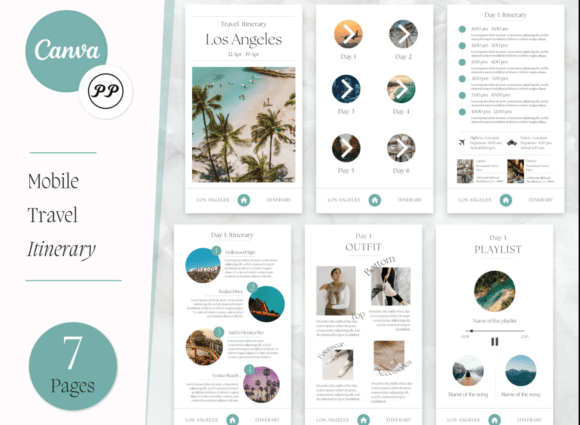
Travel Itinerary Template: Your Mobile-Sized Planning Companion
Planning a trip should feel exciting, not overwhelming. Yet, the logistics—flights, hotel confirmations, tour times, restaurant reservations—can quickly turn into a scattered mess of emails and screenshots. A well-designed Travel Itinerary Template solves this by centralizing every detail into one beautiful, accessible document. This particular template pack is optimized for a Mobile Size of 1080 x 1080 pixels, making it perfect for viewing on your phone, sharing on social media, or keeping as a clean digital reference.
Version 2.0 of this template brings an eye-pleasing aesthetic that balances modern typography with practical layout. The design personality is clean, professional, and approachable. It avoids overly decorative elements that sacrifice readability, instead focusing on clear visual hierarchy. The style works for a weekend getaway or a complex multi-city adventure, presenting information in a way that feels organized and visually satisfying. The overall appeal lies in its versatility—it looks just as good saved to your camera roll as it does posted to your Instagram story.
Where This Template Fits Best
The Travel Itinerary Template in Mobile Size isn't just for personal vacations. Its design principles make it a valuable design asset across various projects. Travel bloggers can use it to share trip highlights with their audience, creating consistent social media graphics that reinforce their brand identity. Tour operators and travel agencies can customize it for client packages, offering a polished, professional touch that enhances perceived value. Event planners might adapt it for conference schedules or destination wedding weekends.
For small business owners, especially those in hospitality or lifestyle sectors, this template can serve as a content marketing tool. Imagine a boutique hotel using a customized version to showcase a curated local experience for their guests. The template's clean modern typography ensures it works across digital platforms—whether embedded in an email newsletter, shared via a messaging app, or printed as a pocket-sized handout. Its square format is inherently social-media-friendly, requiring no cropping or awkward adjustments.
Design Details and Practical Use
This is a Canva-based template, meaning you edit it directly in your browser using a free Canva account. The instruction file provides a direct link to the master template, which you must save a copy of before customizing. This process protects the original design while giving you full creative control. The template uses a combination of sans serif font styles for headings and body text, ensuring excellent readability at small sizes. The typographic choices feel contemporary and clean, avoiding trendy scripts that might date quickly.
The layout uses a clear grid system, with logical sections for dates, times, locations, and notes. This structure creates strong visual hierarchy, guiding the eye naturally from one piece of information to the next. The color palette is neutral with accent options, allowing easy customization to match personal or brand colors. For designers, this template demonstrates how thoughtful editorial design principles apply even to functional documents. The spacing, alignment, and type sizing all work together to reduce cognitive load—something crucial when you're trying to quickly find your flight number while rushing through an airport.
Customization Tips and Best Practices
When you open your copy in Canva, start by updating the core information: destination, dates, and traveler names. Then work through each section systematically. Use the existing text styles as your guide—they're already optimized for the mobile size format. If you change fonts, stick to one or two complementary typefaces to maintain professionalism. A good font pairing might be a geometric sans serif for headings paired with a humanist sans serif for body text. Avoid overly decorative fonts for critical information like times and addresses.
Consider your use case carefully. If you're creating this for personal use, you might add personal notes and reminders. For client-facing use, ensure all branding elements—logos, colors, contact information—are consistent with your other materials. The template's clean structure makes it adaptable, but resist the urge to overcrowd it. White space is your friend, especially at this size. Test the final design on your actual phone screen before sharing. Check that text is legible and that important details stand out at a glance.
Beyond the Basic Itinerary
While designed for travel planning, this template's format has other applications. Its 1080 x 1080 px square layout works for any time-based schedule: workshop agendas, fitness plans, meal prep schedules, or project timelines. The clean typeface selection and logical layout make it adaptable to different contexts. For content creators, it could become a recurring series template—think "Weekly Inspiration" or "Monthly Goals" graphics that maintain visual consistency while varying content.
The included PDF with direct template links simplifies the setup process. Remember, you need both a free Canva account and, for certain features, an Acuity Account (though the core template works without Acuity). The instruction file is straightforward: follow the link, save your copy, and begin editing. This accessibility makes it practical for users of all skill levels, from design professionals to those who simply want a beautiful, functional planning tool.
Ultimately, a great travel itinerary template does more than organize information—it enhances the travel experience itself. By presenting details in an eye-pleasing, easily digestible format, it reduces stress and lets you focus on the adventure ahead. This Mobile Size version, with its thoughtful design and practical dimensions, serves as both a useful tool and a subtle piece of brand identity for professionals who share travel content. It's a small investment in organization that pays dividends in clarity and style.