Design Custom Tumblers with Personalized Photo PNGs and Canva
Creating a truly unique, personalized tumbler used to require specialized equipment or outsourcing to a professional. Now, with the right digital design assets, you can produce stunning, custom drinkware right from your home computer. This collection of Personalized Photo Tumbler PNG and Canva templates is engineered for exactly that purpose, offering a seamless workflow for anyone looking to create high-quality, photo-centric tumblers for personal use or commercial sale.
The Anatomy of a Professional Tumbler Wrap
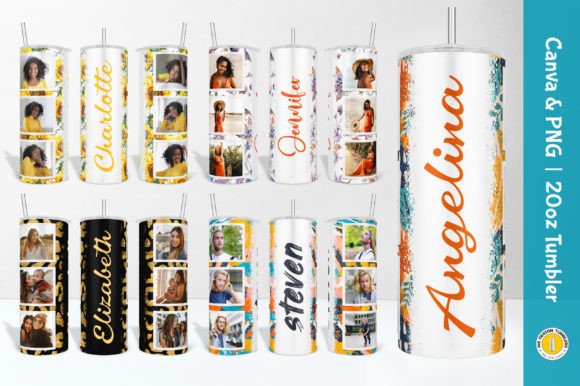
What makes this kit so effective is its focus on professional-grade components. You aren't just getting a single image; you are getting a complete design system. The core of the offering includes 10 straight and 10 tapered seamless PNG files. These are not just generic backgrounds; they are precision-crafted overlays designed to frame your photographs perfectly. The visual style is clean and modern, prioritizing the photo itself while adding a polished, finished look through subtle borders, name plates, or decorative elements.
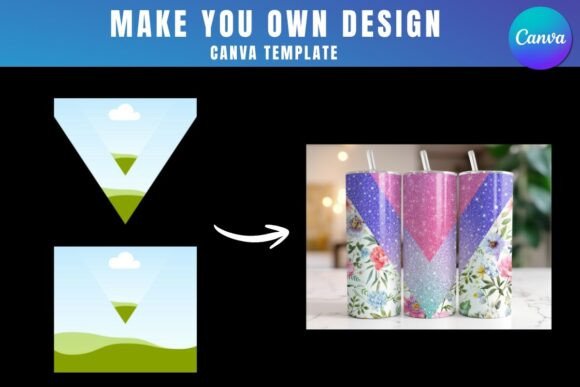
The files themselves are built for quality. At 9.3” x 8.2” with a 300 dpi resolution and transparent background, they meet the standard for high-quality printing. The transparency is key—it means the PNG acts as a flexible frame. You simply place your chosen photo behind it in your editing software, then resize and crop the image to fit the frame. This method gives you complete creative control over the final look without needing advanced masking skills.
Why Canva is the Recommended Tool for Editing
While these PNG files are compatible with virtually any photo editing software—like Adobe Photoshop, GIMP, or even smartphone apps—the listing strongly recommends using Canva. There’s a strategic reason for this. Canva is a web-based platform that removes the friction of complex software. For a small business owner or crafter, this is invaluable. You can upload the PNG overlay, drag and drop your customer’s photo behind it, use Canva’s simple crop and resize tools, and add any custom text using the provided fonts, all within minutes.
This approach democratizes the design process. You don’t need to understand layers, clipping masks, or advanced typography. The template does the heavy lifting. Furthermore, the inclusion of 5 direct links to editable Canva templates for the straight tumbler versions streamlines the process even further. It’s a practical solution that prioritizes speed and ease of use, which is essential when fulfilling custom orders or creating gifts.
From Digital File to Physical Product
The true value of this asset kit is realized in its application. For a small business owner on platforms like Etsy or at local craft markets, this is a turnkey solution for a popular product. Personalized photo tumblers are consistently in demand for gifts like weddings, anniversaries, birthdays, and memorials. By using these templates, you can offer a wide variety of styles (straight and tapered) without designing each one from scratch.
The included mockup files are another critical business tool. These are pre-made images that show your final tumbler design in a realistic setting—perhaps on a desk or held in a hand. Using these mockups in your online store or social media graphics presents your product professionally, building customer trust and helping them visualize the final item. This is a core part of effective brand identity and marketing for any product-based business.
Practical Guidance for Perfect Results
To get the most out of this kit, a bit of planning goes a long way. First, consider your photo source. High-resolution images will always produce a better final product. Advise your customers or choose your own photos with care. Second, understand the difference between the straight and tapered files. The straight PNGs are for cylindrical tumblers, while the tapered files are pre-distorted to account for the narrower bottom of a skinny tumbler, ensuring your final printed design doesn’t look warped.
Font choice is another subtle but important detail. The kit includes 3 free font files and 5 TXT files with font information, allowing you to maintain typographic consistency. Whether you’re adding a name, date, or short message, using the recommended fonts ensures the text integrates seamlessly with the template’s aesthetic. This attention to detail elevates the perceived quality of the final product, moving it from a DIY project to a professional design asset.
Finally, always do a test print. Print your final design on regular paper first to check the layout, color, and sizing before committing to expensive tumbler wrap material. This simple step can save you time and money, and it’s a hallmark of a thoughtful creative professional. The goal is to create a finished tumbler that feels cohesive and intentional, where the photo, the frame, and the text all work together harmoniously.