Designing Your Own Tarot Deck: A Canva Frame Guide
The world of tarot has moved far beyond the confines of mystical shops and ancient texts. Today, custom tarot decks are a powerful tool for branding, storytelling, and creating deeply personal keepsakes. If you've ever dreamed of designing your own deck but felt overwhelmed by the graphic design software required, there's a beautifully simple solution. The Editable Tarot Card Canva Frame Template is a digital asset that bridges the gap between your creative vision and a polished, professional final product, all within the accessible Canva platform.
What Exactly Is a Canva Tarot Frame?
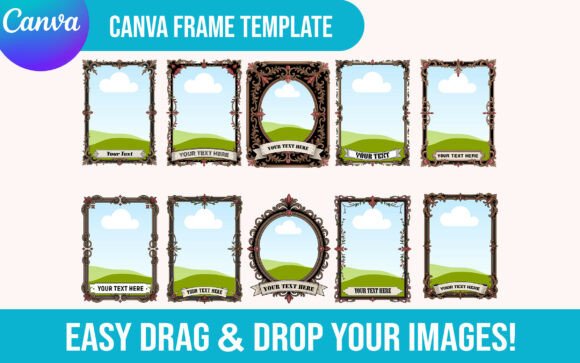
Think of it as a professionally designed skeleton for your tarot cards. This isn't a static image or a finished product. It's a fully editable digital file that you import directly into your Canva account. Once uploaded, you'll find a collection of beautifully crafted frames, borders, and decorative elements that form the structure of a tarot card. The magic lies in its simplicity. You don't need to be a seasoned graphic designer to use it. The template is built with a drag-and-drop interface, allowing you to upload your own artwork, photographs, or illustrations and place them perfectly within the pre-designed frame. It’s a set of design assets that provides the structure, so you can focus entirely on the creative content.
The Style and Personality of the Template
The visual appeal of a quality Editable Tarot Card Canva Frame Template lies in its versatility. The frames themselves are often designed with a blend of classic tarot symbolism and modern aesthetics. You might find intricate art deco borders, celestial-themed corner flourishes, minimalist geometric lines, or ornate Victorian-style embellishments. This variety ensures that the template can adapt to numerous themes, from a mystical, ethereal vibe to a clean, contemporary look. The overall personality is one of sophisticated guidance. It provides the visual hierarchy that makes a tarot card feel balanced and intentional—the frame holds the central image, while space is reserved for the card's number and title in a consistent, readable position.
Practical Applications Beyond the Card Deck
While the primary use is creating a physical or digital tarot deck, the applications of this template extend into numerous creative and commercial projects. Its strength is in its ability to bring a cohesive, mystical, or symbolic aesthetic to a wide range of materials.
For Branding and Marketing
Entrepreneurs and marketers can leverage the tarot aesthetic for unique branding. Imagine a coffee company using the frames to create a series of "The Coffee Tarot" social media posts, each featuring a different blend with a tarot-inspired name and description. A life coach or therapist could design a set of affirmation cards for clients. The frames provide instant brand identity and a memorable visual language that stands out in a crowded digital space. They are perfect for creating eye-catching social media graphics, website banners, or even email newsletter headers that tell a story.
For Personal and Creative Projects
For hobbyists, crafters, and content creators, this template is a gateway to deeply personal projects. You can create a one-of-a-kind tarot deck as a gift for a friend, using family photos or inside jokes as the card imagery. Bloggers can design featured images for articles about spirituality, self-discovery, or creativity. Publishers can use the frames to design chapter headers or decorative elements for a book with a mystical theme. The possibilities are endless, from creating custom printable wall art to designing sublimation-ready graphics for T-shirts and mugs.
How to Evaluate and Use the Template Effectively
Choosing the right template and using it well is key to a successful project. Here’s some practical guidance from a design perspective.
Choosing the Right Frame Set
When selecting your Canva Frame Template, consider the overall style. Does it match the mood you want to convey? Look closely at the included styles. A good set will offer variety—perhaps different border designs, multiple color options, and frames that work for both major and minor arcana cards. Review the product details to ensure it is fully editable. This means you should be able to change colors, resize elements, and, most importantly, easily upload and drop in your own images. The best templates come with a clear PDF instruction guide, making the process of accessing and using the file seamless.
Working Within Canva: A Practical Workflow
Once you've downloaded your digital download, the process is straightforward. Open the provided PDF and click the link to access the template in Canva. From there, your workflow will look something like this:
- Upload Your Art: Gather the images you want to use. These could be your own illustrations, licensed stock photos, or AI-generated art. Upload them to your Canva library.
- Drag and Drop: Select a card frame from the template. Simply drag your chosen image from the uploads panel and drop it into the designated area of the frame. Canva will automatically crop and position it.
- Customize Text: Edit the placeholder text for the card number (e.g., "The Fool," "XIV - Temperance") and any other details. Experiment with the fonts included in the template or choose your own from Canva's vast library.
- Adjust and Refine: Change the background color of the card to complement your image. Ensure your text has good readability against the background. Zoom in to check for clean edges and proper alignment.
- Export for Your Purpose: When you're finished, download your designs. For printing, use a high-quality PDF. For digital use, a PNG or JPG works perfectly.
Ensuring Professionalism and Consistency
The biggest advantage of using a tarot card Canva frame is the consistency it provides. Every card will share the same structural elements, creating a unified and professional-looking deck. This consistency is crucial for building a strong brand identity, whether for a business or a personal project. Pay attention to the small details: use the same font pairing across all cards, maintain a consistent color palette, and ensure your central images are of a similar style and quality. This attention to detail elevates your project from a simple hobbyist creation to a piece of premium design work.
In the end, an Editable Tarot Card Canva Frame Template