Custom Shot Glass Designs Made Simple: The Canva Template Bundle
Elevating Your Craft with Precise Design Assets
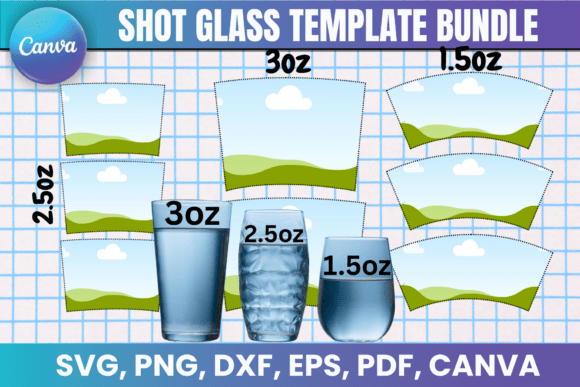
Creating professional-looking custom drinkware has often felt like a high barrier to entry, requiring expensive software or complex graphic design skills. The Shot Glass Canva Template Bundle breaks down that wall, offering a streamlined, accessible way to produce polished, market-ready designs. This isn't just a collection of shapes; it's a thoughtfully assembled toolkit for anyone looking to add a personal or professional touch to glassware. The bundle provides templates specifically sized for 1.5 oz, 2.5 oz, and 3 oz shot glasses, ensuring your artwork wraps perfectly every time without guesswork or tedious resizing.
The visual appeal of these templates lies in their clean, professional foundation. They offer a blank canvas that respects the principles of good packaging design, giving you clear boundaries and safe zones to work within. This structure is crucial for maintaining visual hierarchy and ensuring your final product looks intentional and cohesive. Whether you're aiming for a sleek, modern look with bold sans-serif fonts or a rustic, handcrafted feel with a script font, the template's neutral starting point lets your chosen typeface and graphics take center stage without distraction.
Practical Applications: From Personal Gifts to Small Business Products
The true value of this design asset is its versatility across projects. For the crafter or hobbyist, it transforms a simple gift into something memorable. Imagine creating a set of shot glasses for a wedding with the couple's monogram, or designing personalized favors for a milestone birthday. The included formats—SVG for Cricut and Silhouette, PNG for easy layering, and PDF for print—mean you're equipped for any method, whether it's applying vinyl decals or using sublimation techniques.
For entrepreneurs and small business owners, the bundle is a gateway to product development. A bartender can create branded glassware for their establishment. A local distillery can design limited-edition promotional items. The ability to use these templates to create and sell physical items (while respecting the digital file license) is a significant commercial advantage. The Canva template link is particularly powerful here, allowing for quick, drag-and-drop customization. You can test different color schemes, swap out logos, or adjust text for a seasonal promotion in minutes, maintaining brand consistency across your entire product line.
Even marketers and content creators will find unexpected uses. These templates can generate high-quality social media graphics for product launches or behind-the-scenes looks at your design process. The professional mockups you can create help build a credible brand identity long before the physical product is in hand, aiding in pre-sales and audience engagement.
Integrating the Bundle into Your Design Workflow
Getting started is straightforward, but a few practical steps will ensure the best results. First, consider the project's end goal. Is this for a one-off personal item, or a run of products for sale? This will guide your design complexity and font choice. For readability on a curved, small surface, simpler is often better. A bold sans serif font or a clear, stylized display font usually outperforms an overly intricate script font at this scale.
Evaluate the template's fit by examining the included SVG and PDF files. The guidelines will show you the exact printable area and the curve of the glass. Use this to plan your layout. A great tip is to print a test template on plain paper and wrap it around your glass to check proportions and text placement before committing to vinyl or sublimation paper.
When working in Canva, leverage its library of free and premium fonts to experiment. Try pairing a strong headline font with a simpler one for any secondary text. The real-time editing is perfect for this. For those using Cricut Design Space or Silhouette Studio, the SVG and DXF files provide clean, scalable vectors that cut cleanly. The key is to treat the template not as a rigid constraint, but as a reliable framework that handles the technical dimensions, freeing you up to focus purely on the creative font pairing and graphic elements that make your design unique.
Remember, this is a digital product offering lifetime access. You can return to it for countless projects, refining your technique and expanding your product offerings. It’s a foundational design asset that supports both learning and professional output, making the creation of custom drinkware an accessible and rewarding part of your creative or business toolkit.